New releaseWindows · Standalone + VST3

BeastPedalsStudio

Pedals, amplifiers, cabinets and recording tools in one visual workspace for guitarists, bassists and producers. Move from a clean rhythm part to saturated leads, heavy riffs, drifting echoes or expansive ambient layers, all within the same rig.

$5 $49 Launch price

Limited-time launch price for the new release

Try it in your browser

Instant download · License key by email · One purchase, two computers

Beast Pedals Studio pedalboard with Sawscreamer and Feral in view
  • 17Pedal effects
  • 7Amp voices
  • 4Cabinets
  • 11Rack processors
  • 650Factory presets
  • 24Pedal instances

Overview

Build a rig that sounds like you.

Start with a factory preset, adjust it to suit your instrument, or build your signal chain from scratch. Every pedal, amp, cabinet and rack processor lives in one window, laid out like real gear and wired the way you choose.

The signal chain · click a stage

Stack up to 24 independent pedal instances and drag them into any order. The amp and cabinet sit on the board as a movable pair, so pedals can go before or after them.

Beast Pedals — The pedalboard

01 · The pedalboard

Your whole board in one window.

Pedals sit on a scrolling board just like the real thing. Add with +, remove with ×, right-click to duplicate, and drag to reorder. The lamp beside each name is the bypass switch; double-click any knob to reset it.

  • Up to 24 independent pedal instances
  • One-, two- or three-pedal views
  • Input and output meters with mono/stereo routing
Beast Pedals — Living artwork

02 · Living artwork

Pedals with a pulse.

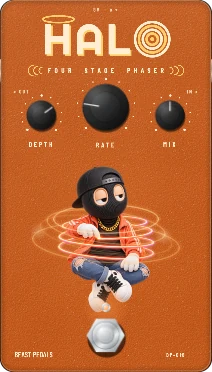
Every pedal is illustrated and animated, and the artwork reacts to how you play. Embers rise from Ravage as you dig in, Halo's four rings spin with its stages, and Downshift's light bars step down with the tuning. It is still gear first: big labelled knobs, clear values, nothing hidden.

  • Artwork responds to the dials, even while bypassed
  • Selectable voices on Ravage and Ignition
  • Exact readouts for every control
Beast Pedals — Amps

03 · Amps

Seven amp voices. Or bring your own.

From GLASS cleans and HEARTH breakup to REACTOR drive, TITAN high gain and the TREMOR bass head, each amp has its own panel and voicing. Prefer your own captures? Load compatible Neural Amp Modeler files into the same slot.

  • Gain, Bass, Middle, Treble, Presence and Master
  • Neural Amp Modeler (NAM) file support
  • 44.1 kHz and 48 kHz sessions handled automatically
Beast Pedals — Cabinets & mics

04 · Cabinets & mics

Mic the cab like a studio.

Pick one of four cabinets, then place two microphones on the grille. Drag them in, set distance, blend and pan, and flip polarity, or skip the virtual cab and load your own impulse response.

  • Dynamic Punch, Dynamic Body, Ribbon Warm, Condenser Air
  • Position, distance, blend, pan and polarity
  • Cabinet impulse response (IR) loading
Beast Pedals — Studio racks

05 · Studio racks

A studio before and after the board.

Pre and post racks hold eleven types of studio processor, from compression and limiting to EQ, tape colour, saturation, stereo enhancement, reverb, filters and gating. Shape dynamics before your drive pedals, then polish the finished tone after the cab.

  • 11 rack processor types
  • Separate pre-board and post-cab racks
  • Each module with its own hardware-style panel
Beast Pedals — Looper

06 · Looper

Loop it. Layer it. Keep playing.

Record a rhythm, add overdubs, undo a layer and change your live sound while the loop keeps its original tone. The looper records the processed signal; the click is never recorded.

  • Record, overdub, undo/redo and clear
  • Metronome, count-in, bar or free length; tap, manual or host tempo
  • WAV import and export
Beast Pedals — MIDI control

07 · MIDI control

Play it with your feet.

Map compatible MIDI controls for pedal switching, preset navigation, wah expression and the looper. Press Learn, move a switch, done. Save your mapping and load it on the next gig.

  • MIDI learn for switches and expression
  • Preset previous / next, pedal toggles, looper
  • Save and load controller mappings

Live demo · no download

Try it in your browser.

This is the real RAVAGE: the plugin's own distortion, amp and cabinet DSP, running right here. Pick a loop, drag the knobs, flip the voice, swap the amp and cab. Headphones recommended.

The pedal library

17 pedals. Each one a character.

Overdrive, distortion, fuzz, compression, wah, modulation, delay, reverb, graphic EQ and experimental pitch shifting. Run any of them up to 24 times on the same board.

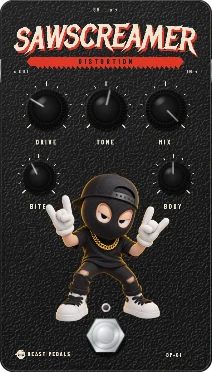
Sawscreamer pedal in Beast Pedals

Drive & distortion · Distortion

Sawscreamer

Hard-edged distortion for riffs. Drive and Tone set the grind, Bite and Body shape the attack and the weight, and Mix blends your dry signal back in.

  • Drive
  • Tone
  • Mix
  • Bite
  • Body
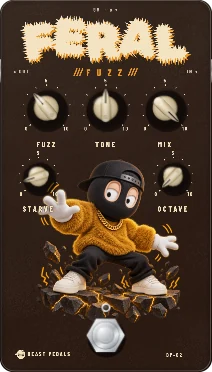
Feral pedal in Beast Pedals

Drive & distortion · Fuzz

Feral

Thick, untamed fuzz. Starve chokes it into sputtering, broken-up textures; Octave stacks an upper octave on top.

  • Fuzz
  • Tone
  • Mix
  • Starve
  • Octave
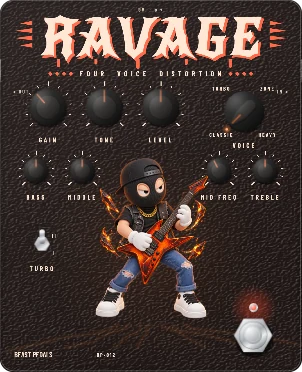
Ravage pedal in Beast Pedals

Drive & distortion · Four-voice distortion

Ravage

Four distortion families in one box: Classic, Turbo, Zone and Heavy. A full EQ with sweepable mids and a two-stage Turbo switch dial it in.

  • Gain
  • Tone
  • Level
  • Voice
  • Bass
  • Middle
  • Mid Freq
  • Treble
  • Turbo
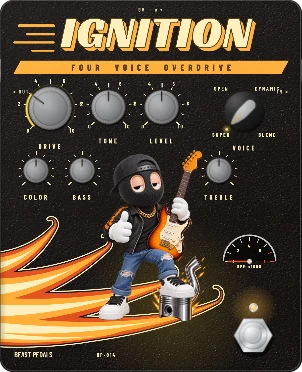
Ignition pedal in Beast Pedals

Drive & distortion · Four-voice overdrive

Ignition

Four overdrive voices: Super, Open, Dynamic and Blend. Color, Bass and Treble tune how hard it pushes the amp.

  • Drive
  • Tone
  • Level
  • Voice
  • Color
  • Bass
  • Treble
Bayou pedal in Beast Pedals

Drive & distortion · Blues overdrive

Bayou

Three knobs, nothing in the way: a blues drive for warm breakup in front of a clean amp.

  • Gain
  • Tone
  • Level
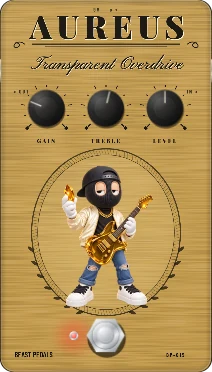
Aureus pedal in Beast Pedals

Drive & distortion · Transparent overdrive

Aureus

A transparent overdrive that pushes your amp harder without painting over its character.

  • Gain
  • Treble
  • Level
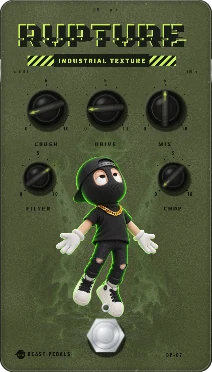
Rupture pedal in Beast Pedals

Drive & distortion · Industrial texture

Rupture

Noise-rock and industrial grit. Crush degrades the signal, Chop cuts it into rhythmic fragments and Filter carves what is left.

  • Crush
  • Drive
  • Mix
  • Filter
  • Chop
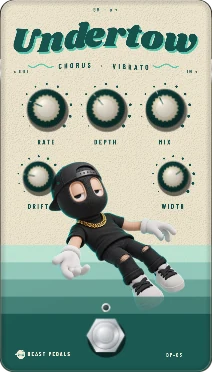
Undertow pedal in Beast Pedals

Modulation · Chorus / vibrato

Undertow

Chorus and vibrato in one. Drift adds wandering movement; Width spreads it across the stereo field.

  • Rate
  • Depth
  • Mix
  • Drift
  • Width
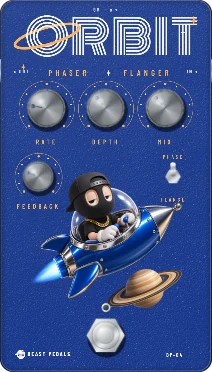
Orbit pedal in Beast Pedals

Modulation · Phaser / flanger

Orbit

Phaser or flanger, switched by Mode. Feedback sharpens the sweep from subtle swirl to jet-plane.

  • Rate
  • Depth
  • Mix
  • Feedback
  • Mode
Halo pedal in Beast Pedals

Modulation · Four-stage phaser

Halo

A classic four-stage phaser with three knobs: smooth, vocal sweeps that sit under chords or leads.

  • Rate
  • Depth
  • Mix
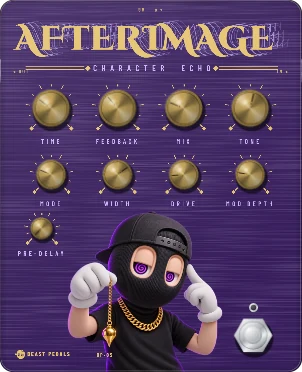
Afterimage pedal in Beast Pedals

Time & space · Character echo

Afterimage

Five delay modes (Mono, Stereo, Ping Pong, Dual Tap and Tape) with Drive, modulation and tone shaping for repeats with character. Note divisions run from 1/32 to a full bar.

  • Time
  • Feedback
  • Mix
  • Tone
  • Mode
  • Width
  • Drive
  • Mod Depth
  • Pre-delay
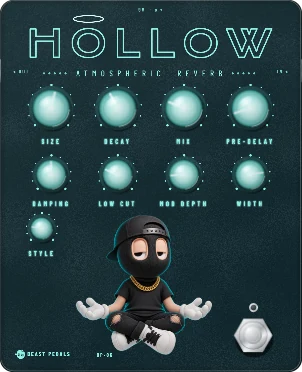
Hollow pedal in Beast Pedals

Time & space · Atmospheric reverb

Hollow

Six reverb styles (Plate, Hall, Room, Cathedral, Infinite and Psychedelic) from a tight room to endless ambient wash.

  • Size
  • Decay
  • Mix
  • Pre-delay
  • Damping
  • Low Cut
  • Mod Depth
  • Width
  • Style
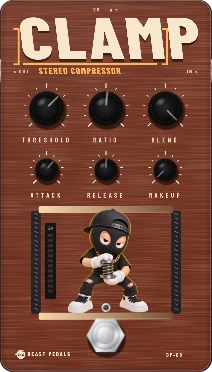
Clamp pedal in Beast Pedals

Dynamics, filter & EQ · Stereo compressor

Clamp

Studio-style stereo compression: threshold −42 to −6 dBFS, ratio 1:1 to 12:1, attack 0.2–80 ms, release 25–800 ms and up to 18 dB makeup. Blend sets parallel compression.

  • Threshold
  • Ratio
  • Blend
  • Attack
  • Release
  • Makeup
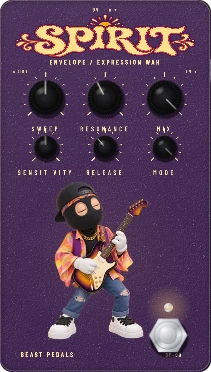
Spirit pedal in Beast Pedals

Dynamics, filter & EQ · Envelope / expression wah

Spirit

Auto-wah that follows your picking, or a manual sweep. Map a MIDI expression pedal and rock it with your foot.

  • Sweep
  • Resonance
  • Mix
  • Sensitivity
  • Release
  • Mode
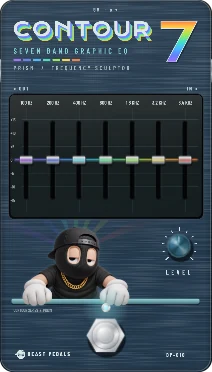
Contour 7 pedal in Beast Pedals

Dynamics, filter & EQ · 7-band graphic EQ

Contour 7

Seven bands from 100 Hz to 6.4 kHz. Scoop the mids, boost a solo or tame a harsh pickup anywhere on the board.

  • 100 Hz
  • 200 Hz
  • 400 Hz
  • 800 Hz
  • 1.6 kHz
  • 3.2 kHz
  • 6.4 kHz
  • Level
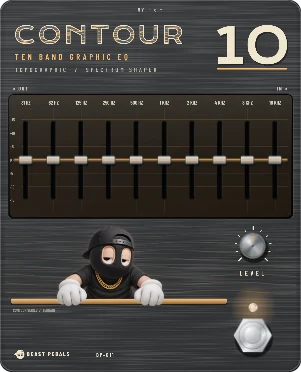
Contour 10 pedal in Beast Pedals

Dynamics, filter & EQ · 10-band graphic EQ

Contour 10

Ten bands from 31 Hz to 16 kHz for precise, full-range tone shaping, including bass guitar.

  • 31 Hz
  • 62 Hz
  • 125 Hz
  • 250 Hz
  • 500 Hz
  • 1 kHz
  • 2 kHz
  • 4 kHz
  • 8 kHz
  • 16 kHz
  • Level
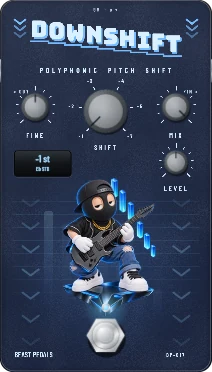
Downshift pedal in Beast Pedals

Pitch · Polyphonic pitch shift

Downshift

Drop your tuning without touching the pegs: E♭, D, D♭, C, B or A standard, with Fine trim and a dry/wet Mix.

  • Shift
  • Fine
  • Mix
  • Level

Amps & cabinets

Seven heads. Four cabs. Two mics.

Every amp shares the same six controls: Gain, Bass, Middle, Treble, Presence and Master, plus its own Mix and Volume. What changes is the voice. The amp and cabinet sit on your pedalboard as a pair you can drag anywhere, so drives can hit the front of the amp while delays and reverbs follow it.

GLASS amplifier panel in Beast Pedals

01 · Pristine American clean

GLASS

An ice-blue and stainless clean head for sparkling, uncoloured cleans.

HEARTH amplifier panel in Beast Pedals

02 · Warm tweed breakup

HEARTH

A tweed-and-oxblood roots combo voiced for warm breakup.

CHIME amplifier panel in Beast Pedals

03 · British Class A chime

CHIME

An ivory-and-copper head with a bright, chiming top end.

REGENT amplifier panel in Beast Pedals

04 · Royal British crunch

REGENT

Racing green and basketweave, voiced for classic British crunch.

REACTOR amplifier panel in Beast Pedals

05 · Hot-rodded cascade

REACTOR

A perforated-metal hot rod with cascading gain for saturated drive.

TITAN amplifier panel in Beast Pedals

06 · Modern tight high gain

TITAN

Titanium-armoured high gain with a tight, modern voice.

TREMOR amplifier panel in Beast Pedals

07 · Low-end authority

TREMOR

Walnut and VU meters: a low-register head for bass and baritone.

NAMYour captures

08 · Neural Amp Modeler

Bring your own

Load compatible Neural Amp Modeler captures into the amp slot, from disk or straight from TONE3000.

How NAM works →

Neural Amp Modeler · TONE3000

Real amp captures, straight into your rig.

Neural Amp Modeler (NAM) uses neural networks to capture the sound and feel of real amplifiers and pedals. Beast Pedals loads NAM captures into its amp slot and impulse responses into its cabinet slot, and its built-in TONE3000 browser finds and downloads community captures without leaving the plugin.

  1. Sign in

    Click Sign in to Tone3000 and your browser opens. Sign in or create a free TONE3000 account, approve Beast Pedals, and it connects by itself. The plugin never asks for your password.

  2. Browse

    Browse your favourites, your own tones, downloads, trending and latest, or search the catalog. Pick NAM A1 + custom or NAM A2 amp captures, or WAV and AIFF cabinet IRs. Clicking the amp or cab in the signal chain opens the matching view.

  3. Load

    Pick a tone and it downloads straight into the amp or cabinet slot. Captures made at 44.1 kHz or 48 kHz are resampled to your session automatically.

  4. Keep

    Downloads stay on your computer after you sign out, and presets recall them. Built-in amps and your own local .nam and IR files work without any account.

TONE3000 tab in Beast Pedals showing amplifier captures TONE3000 tab in Beast Pedals showing cabinet impulse responses
The TONE3000 tab inside Beast Pedals, before signing in

TONE3000 is a separate service and needs a TONE3000 account; its catalog and availability are set by TONE3000. Beast Pedals is not affiliated with TONE3000 or the Neural Amp Modeler project.

New release · launch price

The whole rig for $5.

17 pedals, 7 amps, 4 cabinets, NAM captures, 11 racks, a looper and 650 rigs in one window. Regular price $49.

Limited-time launch price for the new release

See all 17 pedals

Dual-mic studio

Mic the cab like a studio.

Open any cabinet and two microphones appear on the grille. Drag them where you want them, choose a voicing for each, then blend, pan and phase-flip them. Every move changes the sound the way a real mic would. Tap the numbers to see how.

Beast Pedals cabinet and microphone studio with two microphones on a BASTION 4×12
Real interface · BASTION 4×12 with Dynamic Punch at 2 cm and Ribbon Warm at 12 cm
  1. Choose Dynamic Punch, Dynamic Body, Ribbon Warm or Condenser Air for each microphone.

  2. Drag a mic across the speaker. On-axis at the centre is brightest; moving towards the edge rolls off the top end, just like a real off-axis mic.

  3. Pull a mic back up to 60 cm. Close placement adds low-end weight; distance softens the top and adds real time-of-flight delay.

  4. Because each mic hears the speaker after its own delay, two mics at different distances interact the way they do in a studio. Use Phase to flip one when the blend sounds thin.

  5. Set each mic's level to balance the two voicings, for example a bright dynamic up close with a warm ribbon further back.

  6. Spread the two mics across the stereo field for a wide, layered cabinet sound.

  7. Low Cut, High Cut and Brightness fine-tune any cabinet without touching the mics.

AURORA 2×12 in the mic studio with Dynamic Punch and Ribbon Warm
Two mics on AURORA 2×12 · drag them on the grille

Dynamic

Dynamic Punch

Focused and forward: bright enough to cut, a touch of air and a lean low end. The go-to close mic.

Brightness
Body
Air

Dynamic

Dynamic Body

Thicker and darker: more low-mid body under a softer top. For fat rhythm tones.

Brightness
Body
Air

Ribbon

Ribbon Warm

The warmest voice: the most body with smooth, rolled-off highs. A natural partner for a brighter mic.

Brightness
Body
Air

Condenser

Condenser Air

The most open voice: extended top end and air over a lighter low end, for detail and sparkle.

Brightness
Body
Air

Mic voicings and cabinets are original modeled responses designed for Beast Pedals, not captured impulse responses. Load your own IR any time.

Cabinets

Four boxes, four voices.

Each built-in cabinet has its own frequency response: where the low end starts, how much body it adds, how deep the mids scoop and where the top rolls off. The curves below are drawn from the cabinets' actual settings.

Amplifier and cabinet blocks sitting together on the pedalboard
PORCH 1×12 cabinet artwork

PORCH 1×12

Single speaker · linen and walnut

Balanced and intimate. Low end from about 70 Hz, a gentle body bump near 180 Hz, a light mid scoop and a soft presence lift before the top rolls off around 6 kHz.

20 Hz100 Hz1 kHz10 kHz
AURORA 2×12 cabinet artwork

AURORA 2×12

Two speakers · petrol and silver

Bright and articulate. The tightest low end (from about 80 Hz), the strongest presence near 3.2 kHz and the most extended top of the four, out to about 7 kHz.

20 Hz100 Hz1 kHz10 kHz
BASTION 4×12 cabinet artwork

BASTION 4×12

Four speakers · road armour

The big box. The heaviest low-end thump around 135 Hz, the deepest mid scoop near 550 Hz and a hard presence push near 2.4 kHz.

20 Hz100 Hz1 kHz10 kHz
FOUNDATION 1×15 cabinet artwork

FOUNDATION 1×15

Bass cabinet · single 15 with dual ports

Built for bass and baritone. Reaches down to about 32 Hz with weight around 85 Hz and a rounded top that rolls off near 4 kHz.

20 Hz100 Hz1 kHz10 kHz

Cab Polish

Low Cut, High Cut and Brightness fine-tune any cabinet. Mix and Volume set how much of the cab you hear, or swap it for your own impulse response.

  • Low Cut
  • High Cut
  • Brightness
  • IR

Studio tools

Eleven racks and everything around them.

Rack processors go before the pedalboard or after the cabinet. Each type has its own panel, controls and colour, so a glance tells you what is in the chain.

6 slots before the board6 after the cab

Catches peaks before they clip. Set the Ceiling, choose how quickly it lets go with Release, and blend with Mix. Last in the post rack, it keeps your output under control.

  • Ceiling
  • Release
  • Mix

Chromatic tuner

Tune from a clean input tap, with optional output muting so the room stays quiet.

Neural Amp Modeler + IRs

Load NAM amp captures and cabinet impulse responses from disk, or browse TONE3000 without leaving the plugin.

Presets & undo

Save rigs, organize them in categories, import and export them, and undo any edit or rig recall.

Standalone + VST3

Play with no DAW using the standalone app (with ASIO on Windows), or load the VST3 in a compatible DAW.

Resizable window

Opens at 1280 × 800 and resizes freely in width and height to fit your screen.

Latency readout

In the standalone app, Options shows input/output latency, buffer, plugin delay, CPU load and dropouts.

Factory presets

650 rigs across 30 categories.

Starting points for clean, blues, rock, metal, indie, psychedelic, ambient, electro and disco sounds, alongside dedicated bass and baritone rigs. Load one, then make it yours.

  • 01Clean & Studio Utility
  • 02Blues & Roots
  • 03Country, Americana & Folk
  • 04Classic Rock
  • 05Hard Rock
  • 06Punk Rock & Hardcore
  • 07Pop-Punk, Emo & Math Rock
  • 08Grunge & 90s Alternative
  • 09Indie Rock
  • 10Shoegaze & Dream Pop
  • 11Post-Rock, Ambient & Experimental
  • 12Psychedelic
  • 13Surf & Garage
  • 14Pop & Top 40
  • 15Funk, Soul & R&B
  • 16Jazz
  • 17Reggae, Dub & Ska
  • 18Post-Punk & Goth
  • 19Heavy Metal & Thrash
  • 20Nu-Metal
  • 21Metalcore & Deathcore
  • 22Djent & Progressive Metal
  • 23Black Metal
  • 24Death Metal & Grind
  • 25Doom, Stoner & Sludge
  • 26Industrial
  • 27Lo-Fi & Bedroom
  • 28Bass & Baritone
  • 29Electro & French House
  • 30Disco & Future Disco

Specs & license

What you get.

Platform
Windows
Formats
Standalone application + VST3 plug-in
Audio
ASIO in the standalone app; your DAW's driver in the VST3. 44.1 kHz and 48 kHz shortcuts
Pedals
17 effects, up to 24 instances per rig
Amps
GLASS · HEARTH · CHIME · REGENT · REACTOR · TITAN · TREMOR
Cabinets
PORCH 1×12 · AURORA 2×12 · BASTION 4×12 · FOUNDATION 1×15 · Cab Polish
Mics
Two at once: Dynamic Punch, Dynamic Body, Ribbon Warm, Condenser Air
NAM + IR
NAM A1 + custom and A2 captures; WAV/AIFF cabinet IRs; built-in TONE3000 browser
Racks
11 processor types, pre and post
Presets
650 factory rigs in 30 categories
Looper
Overdub, undo/redo, metronome, count-in, WAV import/export
Control
MIDI learn: pedal switching, presets, wah expression, looper

One purchase. Two computers.

  1. BuyInstant digital download. Your license key arrives by email. One license per order.
  2. ActivateCreate your activation account with the email you used at checkout. An internet connection is needed for the first activation.
  3. Play anywhereActivate on up to two computers. Activated paid licenses support offline use.
$5$49Launch price

Limited-time launch price for the new release

FAQ

Good questions.

What exactly do I download?

The Windows standalone application and the Windows VST3 plug-in, plus the factory rig library. Your license key arrives by email straight after checkout.

Do I need a DAW?

No. The standalone app runs on its own with your audio interface (ASIO supported). If you record in a DAW, load the VST3 version instead.

How many computers can I use it on?

Your license supports activation on up to two computers.

Does it need to stay online?

No. An internet connection and account are required for initial activation; activated paid licenses support offline use. Use the same email for your activation account as at checkout.

Can I use my own amp captures and cabinet IRs?

Yes. Load compatible Neural Amp Modeler files and cabinet impulse responses alongside the seven built-in amps and four cabinets.

What are NAM and TONE3000?

Neural Amp Modeler (NAM) captures real amps and pedals with neural networks. TONE3000 is a community library of NAM captures and cabinet IRs. Beast Pedals has a TONE3000 tab built in: sign in with a free TONE3000 account and load captures straight into the amp or cab slot. You can also load your own files from disk without any account.

Is it good for bass?

Yes. TREMOR is a low-register head, FOUNDATION is a 1×15 bass cabinet, Contour 10 covers 31 Hz to 16 kHz, and there is a dedicated Bass & Baritone preset category.

Can I control it with a foot controller?

Yes. Map compatible MIDI controls for pedal switching, preset navigation, wah expression and the looper with MIDI learn.

Plug in.

17 pedals, 7 amps, 4 cabinets, 11 racks, a looper and 650 rigs. One window.

Product page

Limited-time launch price for the new release