New releaseWindows · Standalone + VST3Beast Plugins

ChordBeast

Chord instrument · CB-1

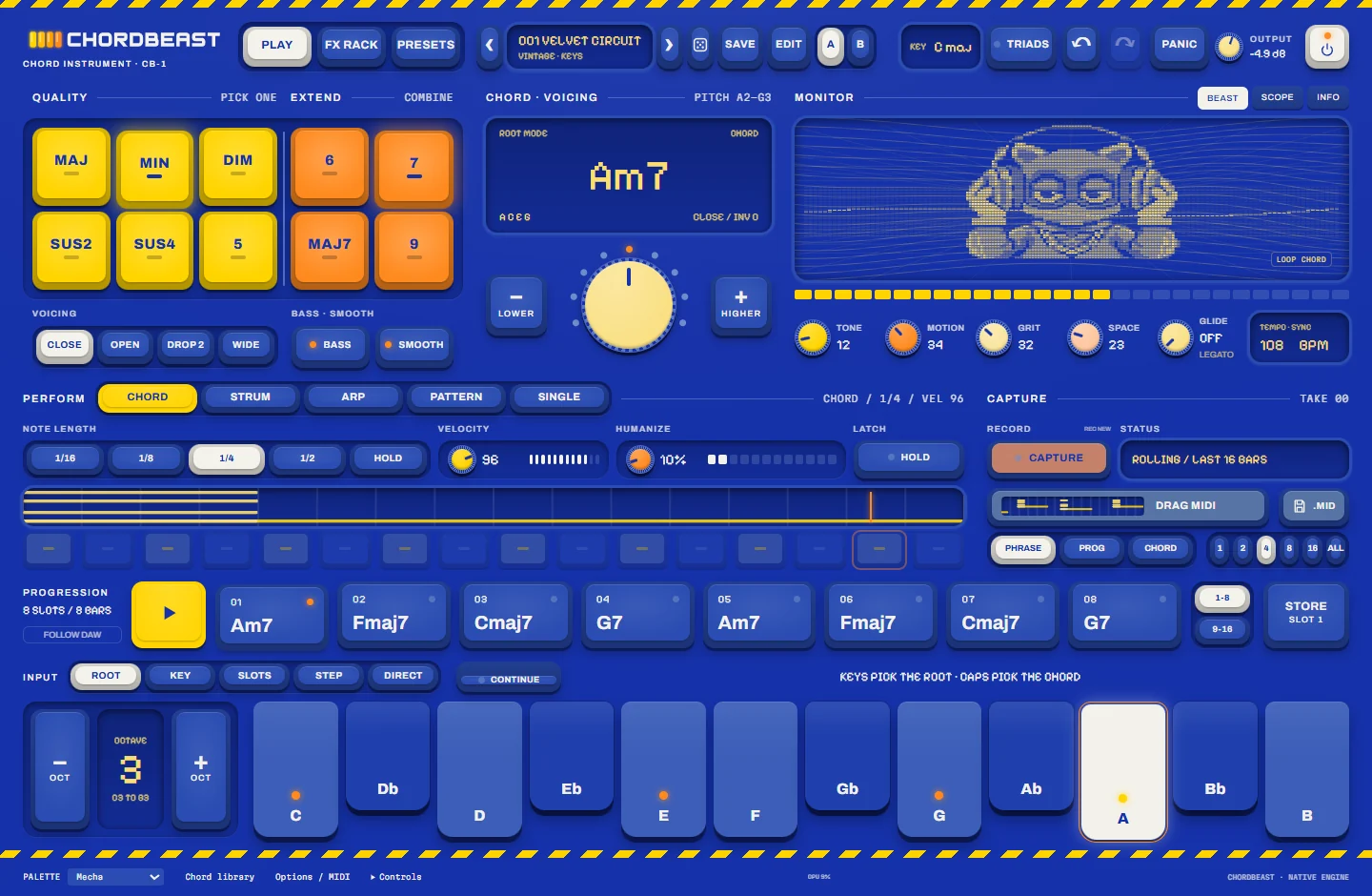
Keys pick the root. Caps pick the chord.

A playable chord instrument for finding a progression, shaping its voicing and feel, and hearing it through vintage-inspired sounds. Press one note, choose the chord with ten caps, then strum it, arpeggiate it or put it in a groove. Everything you play is captured, so the idea is never lost.

$10$59Intro price
Try the caps Learn more

Instant download · License key by email · One purchase, two computers

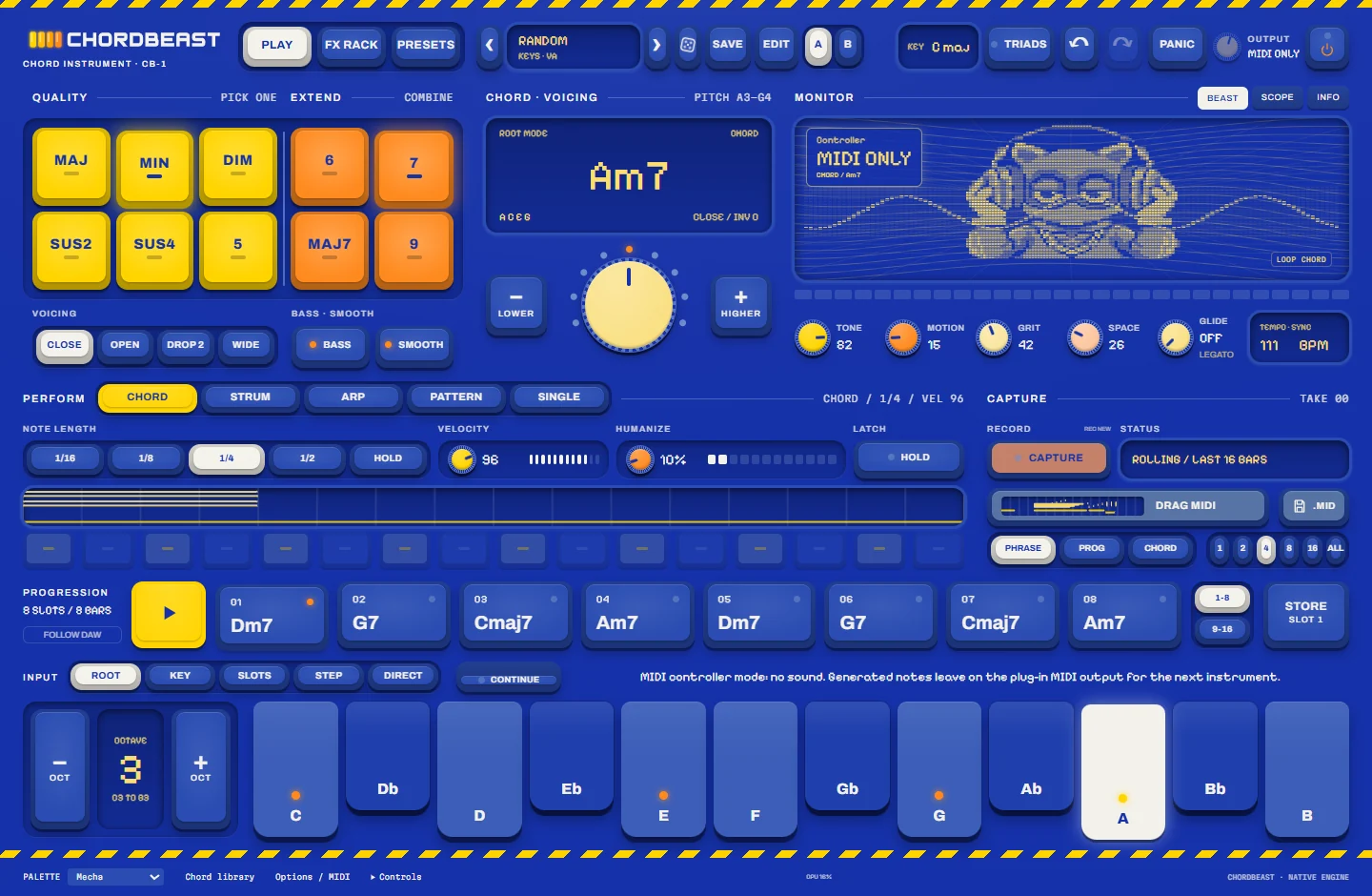
ChordBeast in the Pocket palette playing A minor 7: chord caps, chord display, monitor, perform modes, capture, progression slots and the one-octave keybed
  • 18Chord types
  • 5Play modes
  • 250Sounds
  • 128Progressions
  • 12Effect modules
  • 12Palettes

Overview

Play before you configure.

Harmony, sound and performance sit together on one panel, and the deep editing waits until you ask for it. Built for producers who don't play fluent keys, for players after fresh voicings, and for beatmakers and songwriters who want an idea down fast.

  1. 1Choose a sound250 sounds sorted by genre and role.
  2. 2Play one noteThe key you press is the root.
  3. 3Shape the chordCaps, inversion and voicing.
  4. 4Add movementStrum, arp or a rhythm pattern.
  5. 5Keep itAlways-on capture, saved as MIDI.

Try the caps

One key. Ten caps. Every chord.

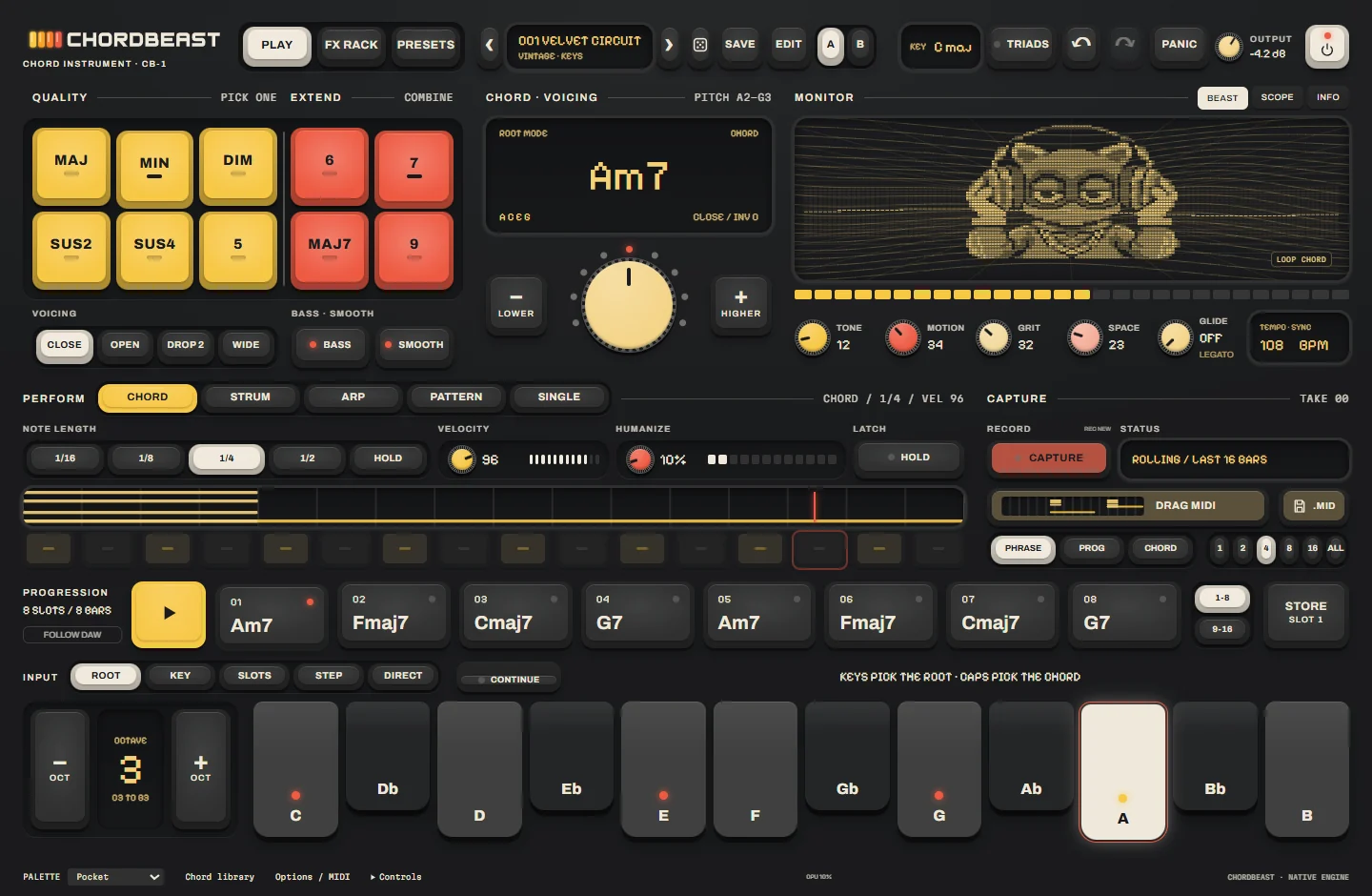
This is how ChordBeast thinks. Pick a root on the keybed, pick one quality cap, add any extensions, then move the inversion and voicing. The display spells the chord the way the plugin does. Change the palette to see all twelve.

QualityPick one

ExtendCombine

Chord · voicingPITCH A2–G3

Root modeCHORD Am7 A C E GCLOSE / INV 0

Input · rootKeys pick the root · caps pick the chord

An interactive sketch of the chord caps. "Hear it" plays a simple tone in your browser: it is not ChordBeast's sound engine.

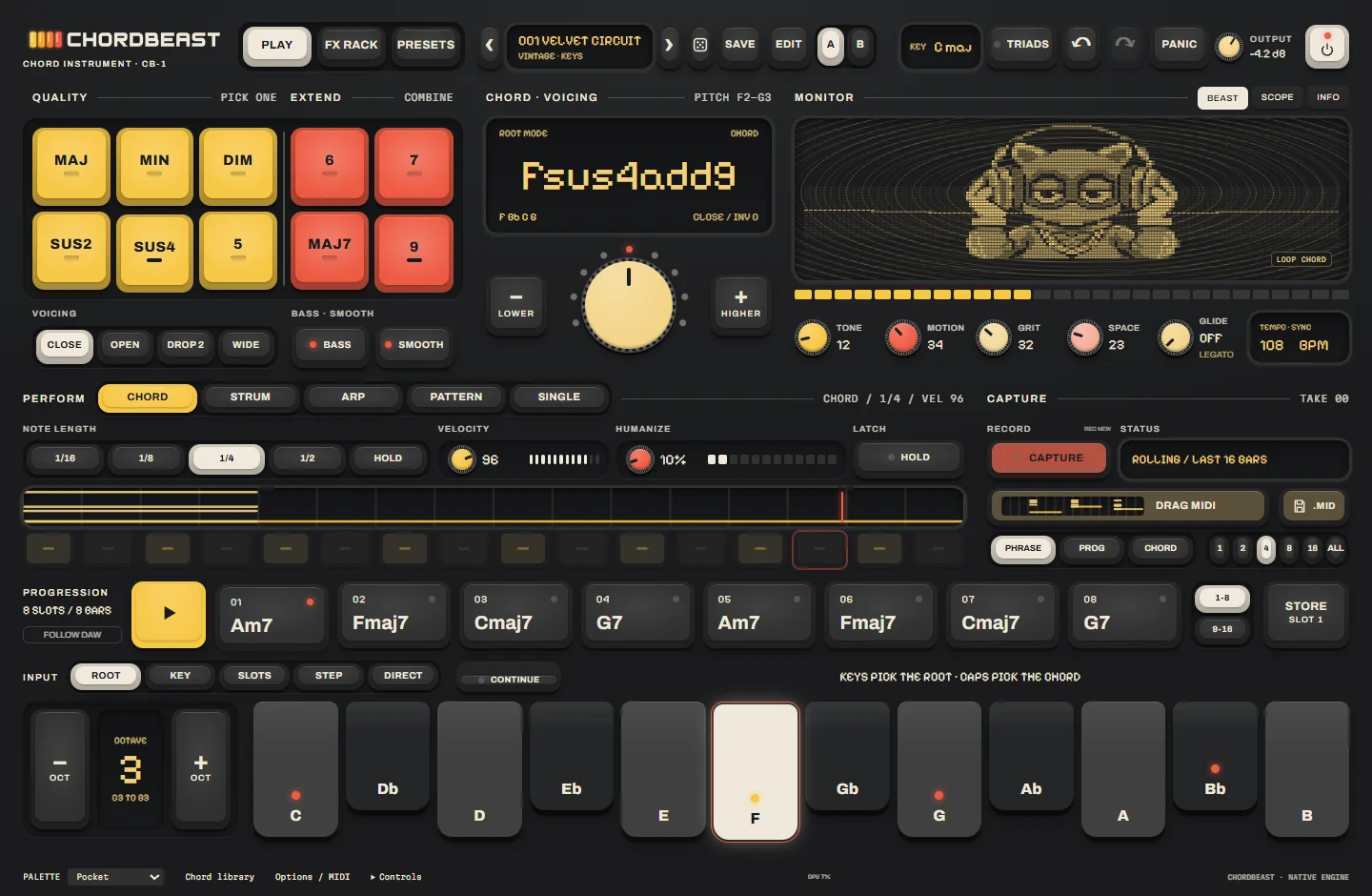
ChordBeast with SUS4 and 9 combined: the display reads Fsus4add9

Chords

Eighteen chord types under one hand.

Quality caps pick one; extension caps combine. Major, minor, power, sus2, sus4, dominant, major and minor sevenths, add9, diminished, half-diminished, augmented, sixths and ninths are all a cap or two away, and the display always spells the result.

  • Inversion from −4 to +4 on the centre dial, with a pitch-range readout
  • Close, Open, Drop 2 or Wide shapes, a bass note and smooth voice leading
  • Key mode: 12 keys, major or natural minor, triads or diatonic sevenths, chosen for you
  • Simple, Flexible or Free play styles, and Direct mode for playing notes as they are
Perform

Hold it, strum it, arp it, groove it.

Five ways to play the same chord. Switch while you play: preset and chord changes crossfade, so sounding notes never cut off.

Block chords with a note length of 1/16 to 1/2 or Hold, velocity 1–127 and a humanize amount.

  • 1/16 · 1/8 · 1/4 · 1/2 · HOLD
  • VELOCITY 1–127
  • HUMANIZE 0–100
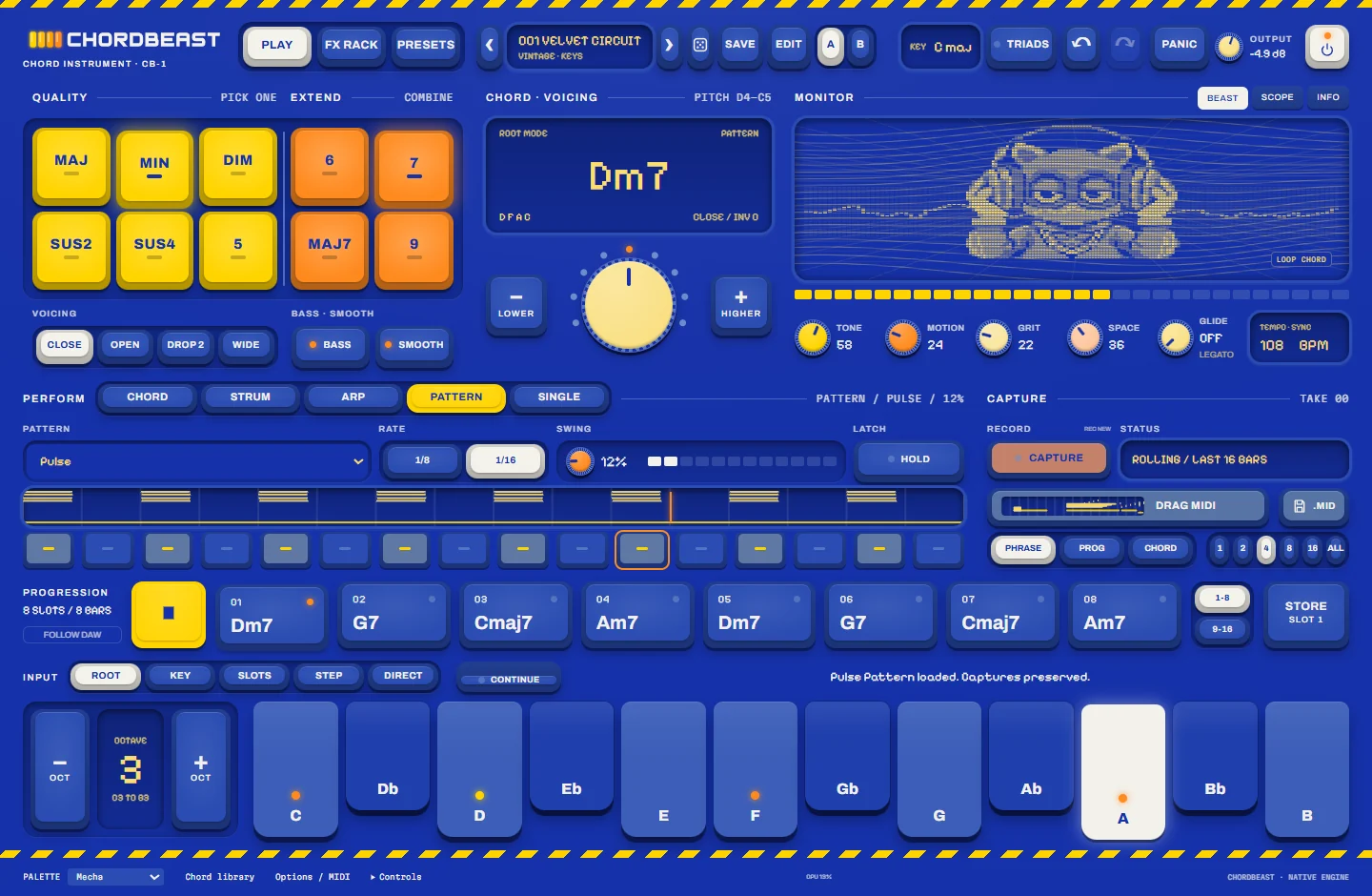
ChordBeast in the Mecha palette playing the Pulse pattern while the progression runs
Pattern mode while the progression plays · Mecha palette
  • Hold / Latch, Panic, and undo and redo for every change
  • Ten performance presets, from Block Hits to House Stabs
  • Tempo from 40 to 200 BPM in the standalone app

Progressions

Sixteen slots. 128 starting points.

Store chords in 16 slots across two banks, give each one half a bar to four bars, then press play. Or start from one of 128 original progressions across 27 genres, each tagged with its roman numerals and a suggested tempo.

Progression8 SLOTS / 8 BARS

  1. 01Am7
  2. 02Fmaj7
  3. 03Cmaj7
  4. 04G7
  5. 05Am7
  6. 06Fmaj7
  7. 07Cmaj7
  8. 08G7
Late NightI–vi–ii–V · 92 BPM
Neon Undertowi–VI–III–VII · 86 BPM
Glass Harbor Drift
Candle Corridor
Champagne Sidechain
  • Duplicate, move, clear and drag slots into a new order
  • Progressions of 4, 6, 8 or 12 chords, with no artist or song names
  • Store from what you just played, then build the song around it

New release

Every chord for $10.

18 chord types, five play modes, 16 progression slots, 250 sounds, a 12-module effects rack and always-on capture.

Learn more

Sounds

250 sounds in 27 genres.

Original sounds built on four modelled engines (virtual analogue, FM, electric keys and an additive organ) with 32 voices. Every sound carries its own effects rack and is levelled to the same loudness, so browsing never jumps in volume.

Sound bank7 families

  • Retro & SynthVintage · Retro · Retrowave · Synthwave · Synthpop
  • PsychedelicPsychedelic Indie · Chill Psych · Neo Psychedelic · Hazy Psychedelic · Indie Psych Rock
  • Indie & DreamDream Pop · Dreamy Indie · Indie Pop · Indie Soul
  • Film ScoreRetro Horror Film Score · Retro Indie Film Score
  • Rock & GrooveDesert Rock · Grunge · Warm Grooves
  • DiscoDisco · Nu Disco · Future Disco · French House
  • ClubDeep House · UK House · Electro · Acid

Roles14

  • Keys30
  • Lead30
  • Bass28
  • Pad24
  • Pluck22
  • Organ19
  • Strings18
  • Stab15
  • Bell14
  • Arp14
  • Brass13
  • Choir10
  • Texture8
  • Drone5

MacrosOn the front panel

TONEMOTIONGRITSPACEGLIDE
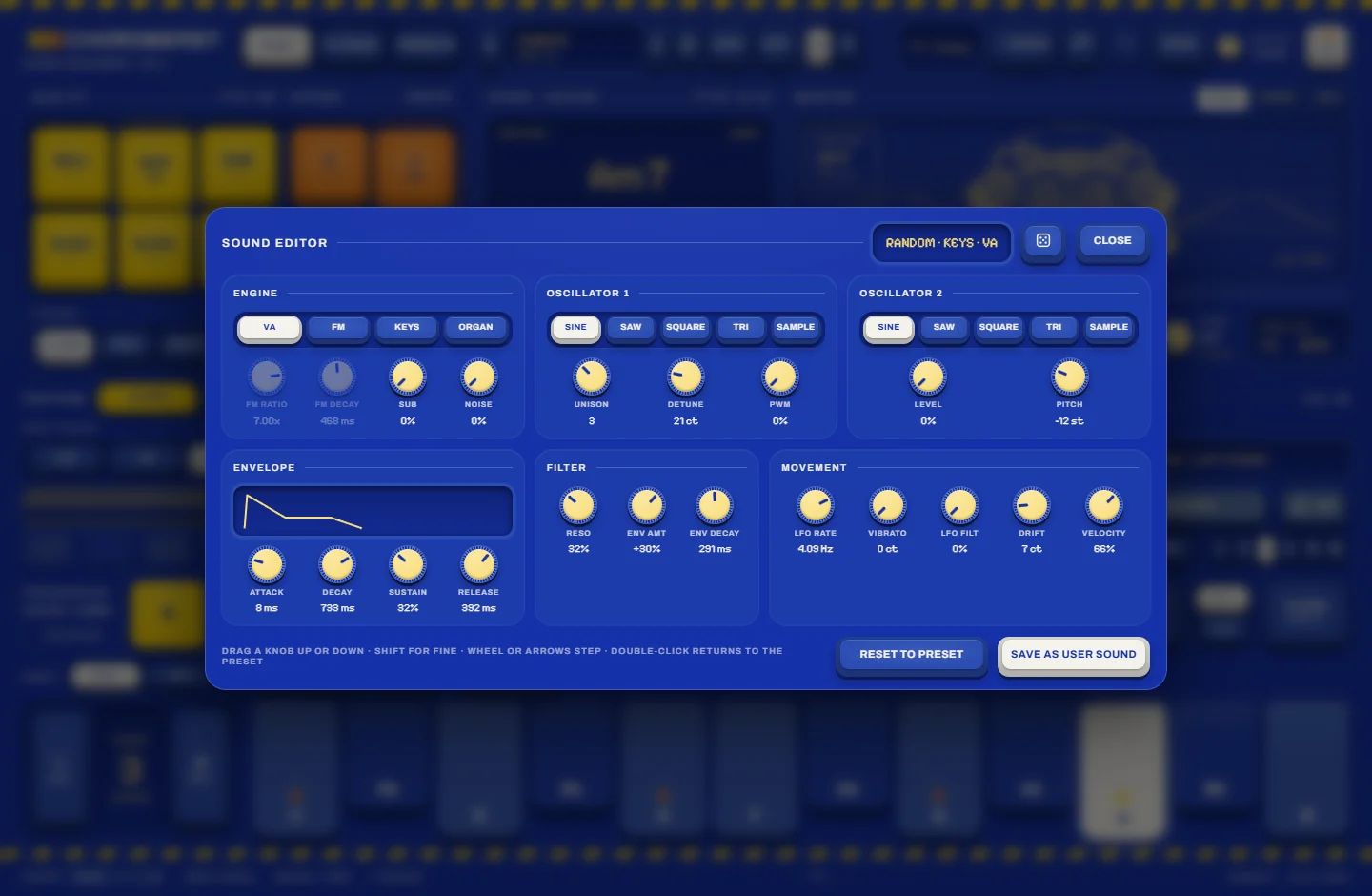
ChordBeast sound editor with engine, oscillator, envelope, filter and movement panels

Sound editor

Depth on demand.

Open the editor for six panels: engine, two oscillators, envelope, filter and movement. Unison up to seven voices, a second oscillator, PWM, sub and noise, FM ratios, a filter envelope and an LFO, all one click away and out of sight until you need them.

  • Load your own samples as oscillator 1 or 2: WAV, AIFF, FLAC or Ogg up to 60 seconds, root note detected for you
  • A/B compare and a dice for random sounds

FX rack

Twelve modules, any order.

Each module has its own power switch, two controls and a mix, and moves earlier or later in the chain. Rack Mix, Bypass All, tempo sync, A/B and a dice sit on top, with input and output meters, a transfer curve, a 40-band spectrum and a waveform watching the signal.

Rack presets: INIT · TAPE · DREAM · MOTION · CRUSH · CLEAN

Capture + MIDI

Keep the notes.

Capture is always on. When something good happens, it is already in the buffer: keep the last 4 to 128 bars as a take and save it as a MIDI file.

Rolling capture

Choose 4, 8, 16, 32, 64 or 128 bars. Press Capture to keep what you just played, or record a new take.

Save as MIDI

Export the phrase, the progression or a single chord at 1 to 16 bars or all of it, as a Type 1 MIDI file with the chords and the bass on separate tracks. Drag the file out of the window or save it.

MIDI out

Send the generated chord on one channel and the bass on another, with an input channel filter and controller pass-through.

ChordBeast in MIDI controller mode: the header reads MIDI ONLY

MIDI controller mode

Drive your other instruments.

Switch to MIDI only and the built-in synth and effects go quiet: ChordBeast becomes a chord, strum, arp and pattern brain for whatever instrument you point its MIDI at.

  • MIDI learn: right-click a control, then move a knob on your controller
  • Chord and bass on separate MIDI channels, 1 to 16

Palettes + monitor

Twelve palettes. Four paints each.

Every palette uses exactly four colours: the body, the ink, one for quality caps and one for extensions. The LED monitor follows the chord with ten animated backdrops, a scope or an info view, and an optional vintage wear adds patina and grain.

Pocket is on the chord explorer. Try the caps

Contour Field LED backdrop
01 · Contour Field
Horizon Grid LED backdrop
02 · Horizon Grid
Wave Weave LED backdrop
03 · Wave Weave
Signal Streaks LED backdrop
04 · Signal Streaks
Orbit Rings LED backdrop
05 · Orbit Rings
Harmonic Ribbon LED backdrop
06 · Harmonic Ribbon
Topo Islands LED backdrop
07 · Topo Islands
Halftone Drift LED backdrop
08 · Halftone Drift
Scan Bars LED backdrop
09 · Scan Bars
Lissajous Knot LED backdrop
10 · Lissajous Knot
ChordBeast in the Mecha palette
The same instrument in Mecha · window size 75–150 %

Specs & license

What you get.

Platform
Windows (64-bit)
Formats
Standalone application + VST3 instrument with MIDI in and out
Chords
18 types; 6 quality and 4 extension caps; inversion −4 to +4; close, open, drop 2 and wide shapes
Input
Root, Key, Slots, Step and Direct modes
Perform
Chord, Strum, Arp (11 types, 15 rates), Pattern (15 patterns, 16 steps), Single
Progressions
16 slots in two banks; 128 factory progressions in 27 genres
Sound
32 voices; VA, FM, electric keys and organ engines; 250 sounds; your own samples
Effects
12-module rack with 6 rack presets
Capture
Rolling 4–128 bars; Type 1 MIDI files at 960 PPQ; MIDI out on two channels
Interface
12 palettes, LED monitor with 10 backdrops, 75–150 % window size

BEASTNETOne purchase. Two computers.

  1. BuyInstant digital download. Your CHB- license key arrives by email. One license per order.
  2. Sign inSign in with your BEAST account (the email you used at checkout) and claim the key. An internet connection is needed to activate.
  3. Play anywhereActivate on up to two computers. Activated paid licenses keep working offline.

A 7-day trial is built in for any verified BEAST account, once per account and computer.

$10$59
Learn more

FAQ

Good questions.

Do I need to know music theory?

No. Press a key for the root and a cap for the chord; the display tells you what you are playing. Key mode can even choose the chord quality for you.

What exactly do I download?

The Windows standalone application and the VST3 instrument, with the factory sounds, progressions and presets. Your license key arrives by email straight after checkout.

Is there a Mac version?

ChordBeast is for Windows (64-bit) at launch.

Can it play my other instruments?

Yes. ChordBeast sends the chord and bass as MIDI, and MIDI controller mode switches its own sound off so it only drives the instrument you route it to.

How do I keep what I played?

Capture is always running. Press Capture to keep the last 4 to 128 bars as a take, then save it as a MIDI file or drag the file out of the window.

How many computers can I use it on?

Two. Sign in with your BEAST account on each computer; after activation a paid license keeps working offline.

Play the chord.

One key, ten caps, five play modes, 250 sounds, and every note kept.

Learn more